Keda
Описание
KEDA (Kubernetes Event-driven Autoscaling) позволяет автоматически масштабировать Kubernetes-объекты на основе событий, таких как нагрузка на процессор, память или другие метрики.
Основные возможности:
- Позволяет масштабировать приложения в реальном времени в зависимости от количества событий, поступающих в систему. Это позволяет оптимизировать использование ресурсов и обеспечивать отзывчивость системы.
- Интегрируется с различными поставщиками событий, такими как Apache Kafka, Azure Queue Storage, RabbitMQ и другими. Это обеспечивает гибкость в выборе источника данных для вашего приложения.
- Интегрируется с механизмом масштабирования Horizontal Pod Autoscaler в Kubernetes, что позволяет использовать их вместе для оптимального управления нагрузкой.
- Предоставляет различные параметры конфигурации, такие как минимальное и максимальное количество реплик, метрики для масштабирования и т. д., что позволяет настраивать его поведение под конкретные потребности приложения.*
Подключение модуля Keda
Описание Yaml
Внимание!
- Описание
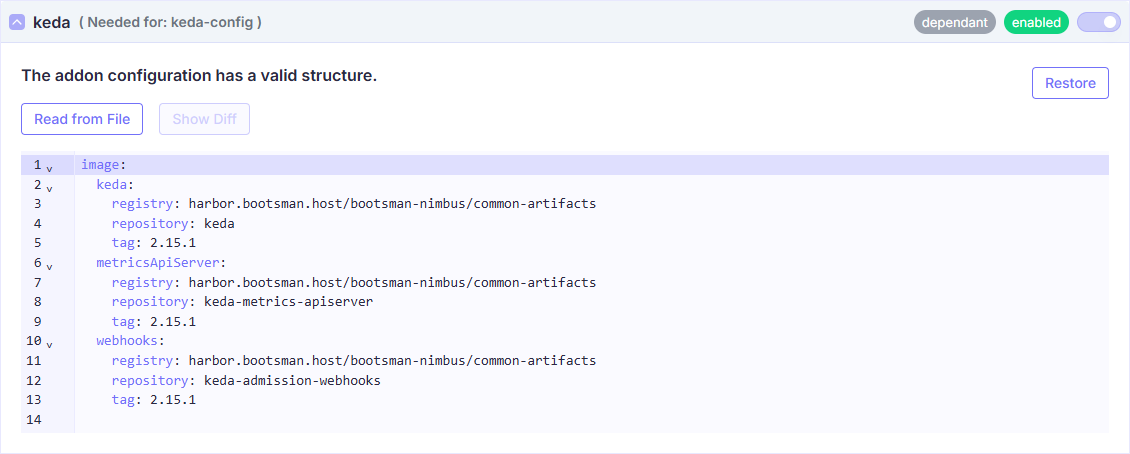
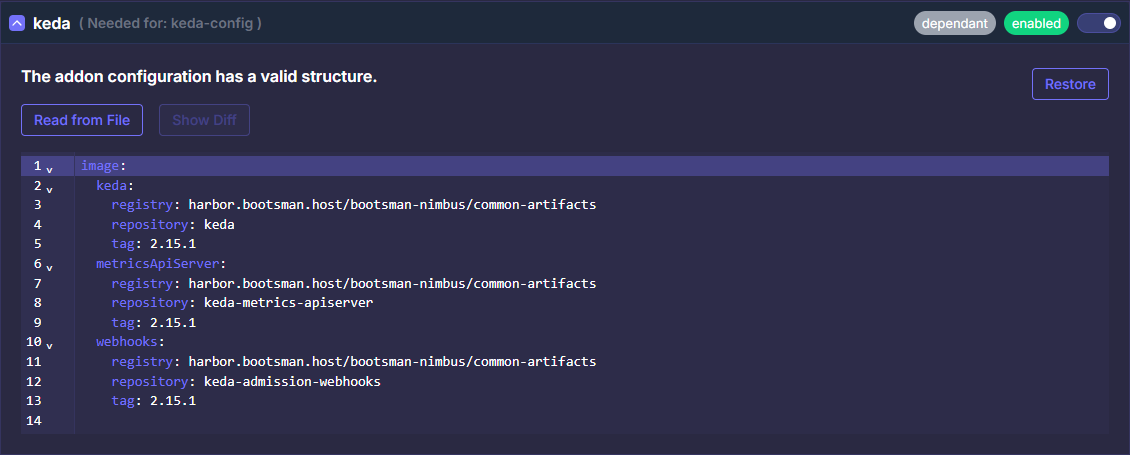
apiVersion: addon.bootsman.tech/v1alpha1
kind: Config
metadata:
  name: CLUSTER_NAME-keda
  namespace: CLUSTER_NAMESPACE
spec:
  enabled: true (1)
  values:
    image:
      keda:
        registry: harbor.bootsman.host/bootsman-nimbus/common-artifacts
        repository: keda
        tag: 2.15.1
      metricsApiServer:
        registry: harbor.bootsman.host/bootsman-nimbus/common-artifacts
        repository: keda-metrics-apiserver
        tag: 2.15.1
      webhooks:
        registry: harbor.bootsman.host/bootsman-nimbus/common-artifacts
        repository: keda-admission-webhooks
        tag: 2.15.1
- True - включено.
False - выключено
Настройка в UI


Все Values
Продвинутые настройки
Ниже представлены тонкие настройки модуля.
Используйте их для расширения конфигурации модуля, если потребуется.
Документация
Более полная документация по модулю:
Keda Docs
Keda Chart
keda Values
values:
global:
image:
# -- Global image registry of KEDA components
registry: null
image:
keda:
# -- Image registry of KEDA operator
registry: harbor.bootsman.host/bootsman-nimbus/common-artifacts
# -- Image name of KEDA operator
repository: keda
# -- Image tag of KEDA operator. Optional, given app version of Helm chart is used by default
tag: 2.15.1
metricsApiServer:
# -- Image registry of KEDA Metrics API Server
registry: harbor.bootsman.host/bootsman-nimbus/common-artifacts
# -- Image name of KEDA Metrics API Server
repository: keda-metrics-apiserver
# -- Image tag of KEDA Metrics API Server. Optional, given app version of Helm chart is used by default
tag: 2.15.1
webhooks:
# -- Image registry of KEDA admission-webhooks
registry: harbor.bootsman.host/bootsman-nimbus/common-artifacts
# -- Image name of KEDA admission-webhooks
repository: keda-admission-webhooks
# -- Image tag of KEDA admission-webhooks . Optional, given app version of Helm chart is used by default
tag: 2.15.1
# -- Image pullPolicy for all KEDA components
pullPolicy: Always
# -- Kubernetes cluster name. Used in features such as emitting CloudEvents
clusterName: kubernetes-default
# -- Kubernetes cluster domain
clusterDomain: cluster.local
crds:
# -- Defines whether the KEDA CRDs have to be installed or not.
install: true
# -- Custom annotations specifically for CRDs
additionalAnnotations:
{}
# foo: bar
# -- Defines Kubernetes namespaces to watch to scale their workloads. Default watches all namespaces
watchNamespace: ""
# -- Name of secret to use to pull images to use to pull Docker images
imagePullSecrets: []
networkPolicy:
# -- Enable network policies
enabled: false
# -- Flavor of the network policies (cilium)
flavor: "cilium"
# -- Allow use of extra egress rules for cilium network policies
cilium:
operator:
extraEgressRules: []
operator:
# -- Name of the KEDA operator
name: keda-operator
# -- ReplicaSets for this Deployment you want to retain (Default: 10)
revisionHistoryLimit: 10
# -- Capability to configure the number of replicas for KEDA operator.
# While you can run more replicas of our operator, only one operator instance will be the leader and serving traffic.
# You can run multiple replicas, but they will not improve the performance of KEDA, it could only reduce downtime during a failover.
# Learn more in [our documentation](https://keda.sh/docs/latest/operate/cluster/#high-availability).
replicaCount: 1
# --Disable response compression for k8s restAPI in client-go.
# Disabling compression simply means that turns off the process of making data smaller for K8s restAPI in client-go for faster transmission.
disableCompression: true
# -- [Affinity] for pod scheduling for KEDA operator. Takes precedence over the `affinity` field
affinity: {}
# podAntiAffinity:
# requiredDuringSchedulingIgnoredDuringExecution:
# - labelSelector:
# matchExpressions:
# - key: app
# operator: In
# values:
# - keda-operator
# topologyKey: "kubernetes.io/hostname"
# -- Additional containers to run as part of the operator deployment
extraContainers: []
# - name: hello-many
# args:
# - -c
# - "while true; do echo hi; sleep 300; done"
# command:
# - /bin/sh
# image: 'busybox:glibc'
# -- Additional init containers to run as part of the operator deployment
extraInitContainers: []
# - name: hello-once
# args:
# - -c
# - "echo 'Hello World!'"
# command:
# - /bin/sh
# image: 'busybox:glibc'
# -- Liveness probes for operator ([docs](https://kubernetes.io/docs/tasks/configure-pod-container/configure-liveness-readiness-startup-probes/))
livenessProbe:
initialDelaySeconds: 25
periodSeconds: 10
timeoutSeconds: 1
failureThreshold: 3
successThreshold: 1
# -- Readiness probes for operator ([docs](https://kubernetes.io/docs/tasks/configure-pod-container/configure-liveness-readiness-startup-probes/#define-readiness-probes))
readinessProbe:
initialDelaySeconds: 20
periodSeconds: 3
timeoutSeconds: 1
failureThreshold: 3
successThreshold: 1
metricsServer:
# -- ReplicaSets for this Deployment you want to retain (Default: 10)
revisionHistoryLimit: 10
# -- Capability to configure the number of replicas for KEDA metric server.
# While you can run more replicas of our metric server, only one instance will used and serve traffic.
# You can run multiple replicas, but they will not improve the performance of KEDA, it could only reduce downtime during a failover.
# Learn more in [our documentation](https://keda.sh/docs/latest/operate/cluster/#high-availability).
replicaCount: 1
# --Disable response compression for k8s restAPI in client-go.
# Disabling compression simply means that turns off the process of making data smaller for K8s restAPI in client-go for faster transmission.
disableCompression: true
# use ClusterFirstWithHostNet if `useHostNetwork: true` https://kubernetes.io/docs/concepts/services-networking/dns-pod-service/#pod-s-dns-policy
# -- Defined the DNS policy for the metric server
dnsPolicy: ClusterFirst
# -- Enable metric server to use host network
useHostNetwork: false
# -- [Affinity] for pod scheduling for Metrics API Server. Takes precedence over the `affinity` field
affinity: {}
# podAntiAffinity:
# requiredDuringSchedulingIgnoredDuringExecution:
# - labelSelector:
# matchExpressions:
# - key: app
# operator: In
# values:
# - keda-operator-metrics-apiserver
# topologyKey: "kubernetes.io/hostname"
# -- Liveness probes for Metrics API Server ([docs](https://kubernetes.io/docs/tasks/configure-pod-container/configure-liveness-readiness-startup-probes/))
livenessProbe:
initialDelaySeconds: 5
periodSeconds: 10
timeoutSeconds: 1
failureThreshold: 3
successThreshold: 1
# -- Readiness probes for Metrics API Server ([docs](https://kubernetes.io/docs/tasks/configure-pod-container/configure-liveness-readiness-startup-probes/#define-readiness-probes))
readinessProbe:
initialDelaySeconds: 5
periodSeconds: 3
timeoutSeconds: 1
failureThreshold: 3
successThreshold: 1
webhooks:
# -- Enable admission webhooks (this feature option will be removed in v2.12)
enabled: true
# -- Port number to use for KEDA admission webhooks. Default is 9443.
port: ""
# -- Port number to use for KEDA admission webhooks health probe
healthProbePort: 8081
# -- Liveness probes for admission webhooks ([docs](https://kubernetes.io/docs/tasks/configure-pod-container/configure-liveness-readiness-startup-probes/))
livenessProbe:
initialDelaySeconds: 25
periodSeconds: 10
timeoutSeconds: 1
failureThreshold: 3
successThreshold: 1
# -- Readiness probes for admission webhooks ([docs](https://kubernetes.io/docs/tasks/configure-pod-container/configure-liveness-readiness-startup-probes/#define-readiness-probes))
readinessProbe:
initialDelaySeconds: 20
periodSeconds: 3
timeoutSeconds: 1
failureThreshold: 3
successThreshold: 1
# -- Enable webhook to use host network, this is required on EKS with custom CNI
useHostNetwork: false
# -- Name of the KEDA admission webhooks
name: keda-admission-webhooks
# -- ReplicaSets for this Deployment you want to retain (Default: 10)
revisionHistoryLimit: 10
# -- Capability to configure the number of replicas for KEDA admission webhooks
replicaCount: 1
# -- [Affinity] for pod scheduling for KEDA admission webhooks. Takes precedence over the `affinity` field
affinity: {}
# podAntiAffinity:
# requiredDuringSchedulingIgnoredDuringExecution:
# - labelSelector:
# matchExpressions:
# - key: app
# operator: In
# values:
# - keda-admission-webhooks
# topologyKey: "kubernetes.io/hostname"
# -- [Failure policy](https://kubernetes.io/docs/reference/access-authn-authz/extensible-admission-controllers/#failure-policy) to use with KEDA admission webhooks
failurePolicy: Ignore
upgradeStrategy:
# -- Capability to configure [Deployment upgrade strategy] for operator
operator: {}
# type: RollingUpdate
# rollingUpdate:
# maxUnavailable: 1
# maxSurge: 1
# -- Capability to configure [Deployment upgrade strategy] for Metrics Api Server
metricsApiServer: {}
# type: RollingUpdate
# rollingUpdate:
# maxUnavailable: 1
# maxSurge: 1
# -- Capability to configure [Deployment upgrade strategy] for Admission webhooks
webhooks: {}
# type: RollingUpdate
# rollingUpdate:
# maxUnavailable: 1
# maxSurge: 1
podDisruptionBudget:
# -- Capability to configure [Pod Disruption Budget]
operator: {}
# minAvailable: 1
# maxUnavailable: 1
# -- Capability to configure [Pod Disruption Budget]
metricServer: {}
# minAvailable: 1
# maxUnavailable: 1
# -- Capability to configure [Pod Disruption Budget]
webhooks: {}
# minAvailable: 1
# maxUnavailable: 1
# -- Custom labels to add into metadata
additionalLabels:
{}
# foo: bar
# -- Custom annotations to add into metadata
additionalAnnotations:
{}
# foo: bar
podAnnotations:
# -- Pod annotations for KEDA operator
keda: {}
# -- Pod annotations for KEDA Metrics Adapter
metricsAdapter: {}
# -- Pod annotations for KEDA Admission webhooks
webhooks: {}
podLabels:
# -- Pod labels for KEDA operator
keda: {}
# -- Pod labels for KEDA Metrics Adapter
metricsAdapter: {}
# -- Pod labels for KEDA Admission webhooks
webhooks: {}
rbac:
# -- Specifies whether RBAC should be used
create: true
# -- Specifies whether RBAC for CRDs should be [aggregated](https://kubernetes.io/docs/reference/access-authn-authz/rbac/#aggregated-clusterroles) to default roles (view, edit, admin)
aggregateToDefaultRoles: false
# -- Whether RBAC for configured CRDs that can have a `scale` subresource should be created
enabledCustomScaledRefKinds: true
# -- List of custom resources that support the `scale` subresource and can be referenced by `scaledobject.spec.scaleTargetRef`.
# The feature needs to be also enabled by `enabledCustomScaledRefKinds`.
# If left empty, RBAC for `apiGroups: *` and `resources: *, */scale` will be created
# note: Deployments and StatefulSets are supported out of the box
scaledRefKinds:
- apiGroup: "*"
kind: "*"
# - apiGroup: argoproj.io
# kind: Rollout
serviceAccount:
operator:
# -- Specifies whether a service account should be created
create: true
# -- The name of the service account to use.
name: keda-operator
# -- Specifies whether a service account should automount API-Credentials
automountServiceAccountToken: true
# -- Annotations to add to the service account
annotations: {}
metricServer:
# -- Specifies whether a service account should be created
create: true
# -- The name of the service account to use.
name: keda-metrics-server
# -- Specifies whether a service account should automount API-Credentials
automountServiceAccountToken: true
# -- Annotations to add to the service account
annotations: {}
webhooks:
# -- Specifies whether a service account should be created
create: true
# -- The name of the service account to use.
name: keda-webhook
# -- Specifies whether a service account should automount API-Credentials
automountServiceAccountToken: true
# -- Annotations to add to the service account
annotations: {}
podIdentity:
azureWorkload:
# -- Set to true to enable Azure Workload Identity usage.
# See https://keda.sh/docs/concepts/authentication/#azure-workload-identity
# This will be set as a label on the KEDA service account.
enabled: false
# Set to the value of the Azure Active Directory Client and Tenant Ids
# respectively. These will be set as annotations on the KEDA service account.
# -- Id of Azure Active Directory Client to use for authentication with Azure Workload Identity. ([docs](https://keda.sh/docs/concepts/authentication/#azure-workload-identity))
clientId: ""
# -- Id Azure Active Directory Tenant to use for authentication with for Azure Workload Identity. ([docs](https://keda.sh/docs/concepts/authentication/#azure-workload-identity))
tenantId: ""
# Set to the value of the service account token expiration duration.
# This will be set as an annotation on the KEDA service account.
# -- Duration in seconds to automatically expire tokens for the service account. ([docs](https://keda.sh/docs/concepts/authentication/#azure-workload-identity))
tokenExpiration: 3600
aws:
irsa:
# -- Specifies whether [AWS IAM Roles for Service Accounts (IRSA)](https://docs.aws.amazon.com/eks/latest/userguide/iam-roles-for-service-accounts.html) is to be enabled or not.
enabled: false
# -- Sets the token audience for IRSA.
# This will be set as an annotation on the KEDA service account.
audience: "sts.amazonaws.com"
# -- Set to the value of the ARN of an IAM role with a web identity provider.
# This will be set as an annotation on the KEDA service account.
roleArn: ""
# -- Sets the use of an STS regional endpoint instead of global.
# Recommended to use regional endpoint in almost all cases.
# This will be set as an annotation on the KEDA service account.
stsRegionalEndpoints: "true"
# -- Set to the value of the service account token expiration duration.
# This will be set as an annotation on the KEDA service account.
tokenExpiration: 86400
gcp:
# -- Set to true to enable GCP Workload Identity.
# See https://keda.sh/docs/2.10/authentication-providers/gcp-workload-identity/
# This will be set as a annotation on the KEDA service account.
enabled: false
# -- GCP IAM Service Account Email which you would like to use for workload identity.
gcpIAMServiceAccount: ""
# -- Set this if you are using an external scaler and want to communicate
# over TLS (recommended). This variable holds the name of the secret that
# will be mounted to the /grpccerts path on the Pod
grpcTLSCertsSecret: ""
# -- Set this if you are using HashiCorp Vault and want to communicate
# over TLS (recommended). This variable holds the name of the secret that
# will be mounted to the /vault path on the Pod
hashiCorpVaultTLS: ""
logging:
operator:
# -- Logging level for KEDA Operator.
# allowed values: `debug`, `info`, `error`, or an integer value greater than 0, specified as string
level: info
# -- Logging format for KEDA Operator.
# allowed values: `json` or `console`
format: console
# -- Logging time encoding for KEDA Operator.
# allowed values are `epoch`, `millis`, `nano`, `iso8601`, `rfc3339` or `rfc3339nano`
timeEncoding: rfc3339
# -- If enabled, the stack traces will be also printed
stackTracesEnabled: false
metricServer:
# -- Logging level for Metrics Server.
# allowed values: `0` for info, `4` for debug, or an integer value greater than 0, specified as string
level: 0
# -- Logging stderrthreshold for Metrics Server
# allowed values: 'DEBUG','INFO','WARN','ERROR','ALERT','EMERG'
stderrthreshold: ERROR
webhooks:
# -- Logging level for KEDA Operator.
# allowed values: `debug`, `info`, `error`, or an integer value greater than 0, specified as string
level: info
# -- Logging format for KEDA Admission webhooks.
# allowed values: `json` or `console`
format: console
# -- Logging time encoding for KEDA Operator.
# allowed values are `epoch`, `millis`, `nano`, `iso8601`, `rfc3339` or `rfc3339nano`
timeEncoding: rfc3339
# -- [Security context] for all containers
# @default -- [See below](#KEDA-is-secure-by-default)
securityContext:
# -- [Security context] of the operator container
# @default -- [See below](#KEDA-is-secure-by-default)
operator:
capabilities:
drop:
- ALL
allowPrivilegeEscalation: false
readOnlyRootFilesystem: true
seccompProfile:
type: RuntimeDefault
# -- [Security context] of the metricServer container
# @default -- [See below](#KEDA-is-secure-by-default)
metricServer:
capabilities:
drop:
- ALL
allowPrivilegeEscalation: false
readOnlyRootFilesystem: true
seccompProfile:
type: RuntimeDefault
# -- [Security context] of the admission webhooks container
# @default -- [See below](#KEDA-is-secure-by-default)
webhooks:
capabilities:
drop:
- ALL
allowPrivilegeEscalation: false
readOnlyRootFilesystem: true
seccompProfile:
type: RuntimeDefault
# -- [Pod security context] for all pods
# @default -- [See below](#KEDA-is-secure-by-default)
podSecurityContext:
# -- [Pod security context] of the KEDA operator pod
# @default -- [See below](#KEDA-is-secure-by-default)
operator:
runAsNonRoot: true
# runAsUser: 1000
# runAsGroup: 1000
# fsGroup: 1000
# -- [Pod security context] of the KEDA metrics apiserver pod
# @default -- [See below](#KEDA-is-secure-by-default)
metricServer:
runAsNonRoot: true
# runAsUser: 1000
# runAsGroup: 1000
# fsGroup: 1000
# -- [Pod security context] of the KEDA admission webhooks
# @default -- [See below](#KEDA-is-secure-by-default)
webhooks:
runAsNonRoot: true
# runAsUser: 1000
# runAsGroup: 1000
# fsGroup: 1000
service:
# -- KEDA Metric Server service type
type: ClusterIP
# -- HTTPS port for KEDA Metric Server service
portHttps: 443
# -- HTTPS port for KEDA Metric Server container
portHttpsTarget: 6443
# -- Annotations to add the KEDA Metric Server service
annotations: {}
# We provides the default values that we describe in our docs:
# https://keda.sh/docs/latest/operate/cluster/
# If you want to specify the resources (or totally remove the defaults), change or comment the following
# lines, adjust them as necessary, or simply add the curly braces after 'operator' and/or 'metricServer'
# and remove/comment the default values
resources:
# -- Manage [resource request & limits] of KEDA operator pod
operator:
limits:
cpu: 1
memory: 1000Mi
requests:
cpu: 100m
memory: 100Mi
# -- Manage [resource request & limits] of KEDA metrics apiserver pod
metricServer:
limits:
cpu: 1
memory: 1000Mi
requests:
cpu: 100m
memory: 100Mi
# -- Manage [resource request & limits] of KEDA admission webhooks pod
webhooks:
limits:
cpu: 1
memory: 1000Mi
requests:
cpu: 100m
memory: 100Mi
# -- Node selector for pod scheduling ([docs](https://kubernetes.io/docs/concepts/scheduling-eviction/assign-pod-node/))
nodeSelector: {}
# -- Tolerations for pod scheduling ([docs](https://kubernetes.io/docs/concepts/scheduling-eviction/taint-and-toleration/))
tolerations: []
topologySpreadConstraints:
# -- [Pod Topology Constraints] of KEDA operator pod
operator: []
# -- [Pod Topology Constraints] of KEDA metrics apiserver pod
metricsServer: []
# -- [Pod Topology Constraints] of KEDA admission webhooks pod
webhooks: []
# -- [Affinity] for pod scheduling for KEDA operator, Metrics API Server and KEDA admission webhooks.
affinity: {}
# podAntiAffinity:
# requiredDuringSchedulingIgnoredDuringExecution:
# - labelSelector:
# matchExpressions:
# - key: app
# operator: In
# values:
# - keda-operator
# - keda-operator-metrics-apiserver
# - keda-admission-webhooks
# topologyKey: "kubernetes.io/hostname"
# -- priorityClassName for all KEDA components
priorityClassName: ""
## The default HTTP timeout in milliseconds that KEDA should use
## when making requests to external services. Removing this defaults to a
## reasonable default
http:
# -- The default HTTP timeout to use for all scalers that use raw HTTP clients (some scalers use SDKs to access target services. These have built-in HTTP clients, and the timeout does not necessarily apply to them)
timeout: 3000
keepAlive:
# -- Enable HTTP connection keep alive
enabled: true
# -- The minimum TLS version to use for all scalers that use raw HTTP clients (some scalers use SDKs to access target services. These have built-in HTTP clients, and this value does not necessarily apply to them)
minTlsVersion: TLS12
## This setting lets you enable profiling for all of the components of KEDA and in the specific port you choose
## This can be useful when trying to investigate errors like memory leaks or CPU or even look at goroutines to understand better
## This setting is disabled by default
profiling:
operator:
# -- Enable profiling for KEDA operator
enabled: false
# -- Expose profiling on a specific port
port: 8082
metricsServer:
# -- Enable profiling for KEDA metrics server
enabled: false
# -- Expose profiling on a specific port
port: 8083
webhooks:
# -- Enable profiling for KEDA admission webhook
enabled: false
# -- Expose profiling on a specific port
port: 8084
## Extra KEDA Operator and Metrics Adapter container arguments
extraArgs:
# -- Additional KEDA Operator container arguments
keda: {}
# -- Additional Metrics Adapter container arguments
metricsAdapter: {}
# -- Additional environment variables that will be passed onto all KEDA components
env: []
# - name: ENV_NAME
# value: 'ENV-VALUE'
# Extra volumes and volume mounts for the deployment. Optional.
volumes:
keda:
# -- Extra volumes for KEDA deployment
extraVolumes: []
# -- Extra volume mounts for KEDA deployment
extraVolumeMounts: []
metricsApiServer:
# -- Extra volumes for metric server deployment
extraVolumes: []
# -- Extra volume mounts for metric server deployment
extraVolumeMounts: []
webhooks:
# -- Extra volumes for admission webhooks deployment
extraVolumes: []
# -- Extra volume mounts for admission webhooks deployment
extraVolumeMounts: []
prometheus:
metricServer:
# -- Enable metric server Prometheus metrics expose
enabled: false
# -- HTTP port used for exposing metrics server prometheus metrics
port: 8080
# -- HTTP port name for exposing metrics server prometheus metrics
portName: metrics
serviceMonitor:
# -- Enables ServiceMonitor creation for the Prometheus Operator
enabled: false
# -- JobLabel selects the label from the associated Kubernetes service which will be used as the job label for all metrics. [ServiceMonitor Spec]
jobLabel: ""
# -- TargetLabels transfers labels from the Kubernetes `Service` onto the created metrics
targetLabels: []
# -- PodTargetLabels transfers labels on the Kubernetes `Pod` onto the created metrics
podTargetLabels: []
# -- Name of the service port this endpoint refers to. Mutually exclusive with targetPort
port: metrics
# -- Name or number of the target port of the Pod behind the Service, the port must be specified with container port property. Mutually exclusive with port
targetPort: ""
# -- Interval at which metrics should be scraped If not specified Prometheus’ global scrape interval is used.
interval: ""
# -- Timeout after which the scrape is ended If not specified, the Prometheus global scrape timeout is used unless it is less than Interval in which the latter is used
scrapeTimeout: ""
# -- DEPRECATED. List of expressions that define custom relabeling rules for metric server ServiceMonitor crd (prometheus operator). [RelabelConfig Spec]
relabellings: []
# -- List of expressions that define custom relabeling rules for metric server ServiceMonitor crd (prometheus operator). [RelabelConfig Spec]
relabelings: []
# -- List of expressions that define custom metric relabeling rules for metric server ServiceMonitor crd after scrape has happened (prometheus operator). [RelabelConfig Spec]
metricRelabelings: []
# -- Additional labels to add for metric server using ServiceMonitor crd (prometheus operator)
additionalLabels: {}
# -- HTTP scheme used for scraping. Defaults to `http`
scheme: http
# -- TLS configuration for scraping metrics
tlsConfig: {}
# caFile: /etc/prom-certs/root-cert.pem
# certFile: /etc/prom-certs/cert-chain.pem
# insecureSkipVerify: true
# keyFile: /etc/prom-certs/key.pem
podMonitor:
# -- Enables PodMonitor creation for the Prometheus Operator
enabled: false
# -- Scraping interval for metric server using podMonitor crd (prometheus operator)
interval: ""
# -- Scraping timeout for metric server using podMonitor crd (prometheus operator)
scrapeTimeout: ""
# -- Scraping namespace for metric server using podMonitor crd (prometheus operator)
namespace: ""
# -- Additional labels to add for metric server using podMonitor crd (prometheus operator)
additionalLabels: {}
# -- List of expressions that define custom relabeling rules for metric server podMonitor crd (prometheus operator)
relabelings: []
# -- List of expressions that define custom metric relabeling rules for metric server PodMonitor crd after scrape has happened (prometheus operator). [RelabelConfig Spec]
metricRelabelings: []
operator:
# -- Enable KEDA Operator prometheus metrics expose
enabled: false
# -- Port used for exposing KEDA Operator prometheus metrics
port: 8080
serviceMonitor:
# -- Enables ServiceMonitor creation for the Prometheus Operator
enabled: false
# -- JobLabel selects the label from the associated Kubernetes service which will be used as the job label for all metrics. [ServiceMonitor Spec]
jobLabel: ""
# -- TargetLabels transfers labels from the Kubernetes `Service` onto the created metrics
targetLabels: []
# -- PodTargetLabels transfers labels on the Kubernetes `Pod` onto the created metrics
podTargetLabels: []
# -- Name of the service port this endpoint refers to. Mutually exclusive with targetPort
port: metrics
# -- Name or number of the target port of the Pod behind the Service,
# the port must be specified with container port property. Mutually exclusive with port
targetPort: ""
# -- Interval at which metrics should be scraped If not specified Prometheus’ global scrape interval is used.
interval: ""
# -- Timeout after which the scrape is ended If not specified, the Prometheus global scrape timeout is used unless it is less than Interval in which the latter is used
scrapeTimeout: ""
# -- DEPRECATED. List of expressions that define custom relabeling rules for metric server ServiceMonitor crd (prometheus operator). [RelabelConfig Spec]
relabellings: []
# -- List of expressions that define custom relabeling rules for metric server ServiceMonitor crd (prometheus operator). [RelabelConfig Spec]
relabelings: []
# -- List of expressions that define custom metric relabeling rules for metric server ServiceMonitor crd after scrape has happened (prometheus operator). [RelabelConfig Spec]
metricRelabelings: []
# -- Additional labels to add for metric server using ServiceMonitor crd (prometheus operator)
additionalLabels: {}
# -- HTTP scheme used for scraping. Defaults to `http`
scheme: http
# -- TLS configuration for scraping metrics
tlsConfig: {}
# caFile: /etc/prom-certs/root-cert.pem
# certFile: /etc/prom-certs/cert-chain.pem
# insecureSkipVerify: true
# keyFile: /etc/prom-certs/key.pem
podMonitor:
# -- Enables PodMonitor creation for the Prometheus Operator
enabled: false
# -- Scraping interval for KEDA Operator using podMonitor crd (prometheus operator)
interval: ""
# -- Scraping timeout for KEDA Operator using podMonitor crd (prometheus operator)
scrapeTimeout: ""
# -- Scraping namespace for KEDA Operator using podMonitor crd (prometheus operator)
namespace: ""
# -- Additional labels to add for KEDA Operator using podMonitor crd (prometheus operator)
additionalLabels: {}
# -- List of expressions that define custom relabeling rules for KEDA Operator podMonitor crd (prometheus operator)
relabelings: []
# -- List of expressions that define custom metric relabeling rules for metric server PodMonitor crd after scrape has happened (prometheus operator). [RelabelConfig Spec]
metricRelabelings: []
prometheusRules:
# -- Enables PrometheusRules creation for the Prometheus Operator
enabled: false
# -- Scraping namespace for KEDA Operator using prometheusRules crd (prometheus operator)
namespace: ""
# -- Additional labels to add for KEDA Operator using prometheusRules crd (prometheus operator)
additionalLabels: {}
# -- Additional alerts to add for KEDA Operator using prometheusRules crd (prometheus operator)
alerts:
[]
# - alert: KedaScalerErrors
# annotations:
# description: Keda scaledObject {{ $labels.scaledObject }} is experiencing errors with {{ $labels.scaler }} scaler
# summary: Keda Scaler {{ $labels.scaler }} Errors
# expr: sum by ( scaledObject , scaler) (rate(keda_metrics_adapter_scaler_errors[2m])) > 0
# for: 2m
# labels:
webhooks:
# -- Enable KEDA admission webhooks prometheus metrics expose
enabled: false
# -- Port used for exposing KEDA admission webhooks prometheus metrics
port: 8080
serviceMonitor:
# -- Enables ServiceMonitor creation for the Prometheus webhooks
enabled: false
# -- jobLabel selects the label from the associated Kubernetes service which will be used as the job label for all metrics. [ServiceMonitor Spec]
jobLabel: ""
# -- TargetLabels transfers labels from the Kubernetes `Service` onto the created metrics
targetLabels: []
# -- PodTargetLabels transfers labels on the Kubernetes `Pod` onto the created metrics
podTargetLabels: []
# -- Name of the service port this endpoint refers to. Mutually exclusive with targetPort
port: metrics
# -- Name or number of the target port of the Pod behind the Service, the port must be specified with container port property. Mutually exclusive with port
targetPort: ""
# -- Interval at which metrics should be scraped If not specified Prometheus’ global scrape interval is used.
interval: ""
# -- Timeout after which the scrape is ended If not specified, the Prometheus global scrape timeout is used unless it is less than Interval in which the latter is used
scrapeTimeout: ""
# -- DEPRECATED. List of expressions that define custom relabeling rules for metric server ServiceMonitor crd (prometheus operator). [RelabelConfig Spec]
relabellings: []
# -- List of expressions that define custom relabeling rules for metric server ServiceMonitor crd (prometheus operator). [RelabelConfig Spec]
relabelings: []
# -- List of expressions that define custom metric relabeling rules for metric server ServiceMonitor crd after scrape has happened (prometheus operator). [RelabelConfig Spec]
metricRelabelings: []
# -- Additional labels to add for metric server using ServiceMonitor crd (prometheus operator)
additionalLabels: {}
# -- HTTP scheme used for scraping. Defaults to `http`
scheme: http
# -- TLS configuration for scraping metrics
tlsConfig: {}
# caFile: /etc/prom-certs/root-cert.pem
# certFile: /etc/prom-certs/cert-chain.pem
# insecureSkipVerify: true
# keyFile: /etc/prom-certs/key.pem
prometheusRules:
# -- Enables PrometheusRules creation for the Prometheus Operator
enabled: false
# -- Scraping namespace for KEDA admission webhooks using prometheusRules crd (prometheus operator)
namespace: ""
# -- Additional labels to add for KEDA admission webhooks using prometheusRules crd (prometheus operator)
additionalLabels: {}
# -- Additional alerts to add for KEDA admission webhooks using prometheusRules crd (prometheus operator)
alerts: []
opentelemetry:
collector:
# -- Uri of OpenTelemetry Collector to push telemetry to
uri: ""
operator:
# -- Enable pushing metrics to an OpenTelemetry Collector for operator
enabled: false
certificates:
# -- Enables the self generation for KEDA TLS certificates inside KEDA operator
autoGenerated: true
# -- Secret name to be mounted with KEDA TLS certificates
secretName: kedaorg-certs
# -- Path where KEDA TLS certificates are mounted
mountPath: /certs
certManager:
# -- Enables Cert-manager for certificate management
enabled: false
# -- Certificate duration
duration: 8760h0m0s # 1 year
# -- Certificate renewal time before expiration
renewBefore: 5840h0m0s # 8 months
# -- Generates a self-signed CA with Cert-manager.
# If generateCA is false, the secret with the CA
# has to be annotated with `cert-manager.io/allow-direct-injection: "true"`
generateCA: true
# -- Secret name where the CA is stored (generatedby cert-manager or user given)
caSecretName: "kedaorg-ca"
# -- Add labels/annotations to secrets created by Certificate resources
# [docs](https://cert-manager.io/docs/usage/certificate/#creating-certificate-resources)
secretTemplate: {}
# annotations:
# my-secret-annotation-1: "foo"
# my-secret-annotation-2: "bar"
# labels:
# my-secret-label: foo
# -- Reference to custom Issuer. If issuer.generate is false, then issuer.group, issuer.kind and issuer.name are required
issuer:
# -- Generates an Issuer resource with Cert-manager
generate: true
# -- Custom Issuer name. Required when generate: false
name: foo-org-ca
# -- Custom Issuer kind. Required when generate: false
kind: ClusterIssuer
# -- Custom Issuer group. Required when generate: false
group: cert-manager.io
operator:
# -- Location(s) of CA files for authentication of external TLS connections such as TLS-enabled metrics sources
# caDirs:
# - /custom/ca
permissions:
metricServer:
restrict:
# -- Restrict Secret Access for Metrics Server
secret: false
operator:
restrict:
# -- Restrict Secret Access for KEDA operator
# if true, KEDA operator will be able to read only secrets in {{ .Release.Namespace }} namespace
secret: false
# -- Array of strings denoting what secrets the KEDA operator will be able to read, this takes into account
# also the configured `watchNamespace`.
# the default is an empty array -> no restriction on the secret name
namesAllowList: []
# -- Array of extra K8s manifests to deploy
extraObjects: []
# - apiVersion: keda.sh/v1alpha1
# kind: ClusterTriggerAuthentication
# metadata:
# name: aws-credentials
# namespace: keda
# spec:
# podIdentity:
# provider: aws-eks
# -- Capability to turn on/off ASCII art in Helm installation notes
asciiArt: true
# -- When specified, each rendered resource will have `app.kubernetes.io/managed-by: ${this}` label on it. Useful, when using only helm template with some other solution.
customManagedBy: ""
Подключение модуля Keda Config
Заметка
Модуль Keda Config содержит дополнительные настройки и требуется только для управляющего кластера.
Для подчиненного кластера модуль недоступен
Описание Yaml
Внимание!
- Описание
- True - включено.
False - выключено
Настройка в UI
Примеры использования
Документация
Более полная документация по модулю:
Keda Docs
Keda ScaledObject Spec
Основные тезисы о работе с Keda:
- Объекты и правила скалирования определяются объектом ScaledObject.
- Для каждого объекта кластера может быть только один ScaledObject
Автоматическое масштабирование экземпляров приложения (pods)
Описание полей
ScaledObject.yaml
apiVersion: keda.sh/v1alpha1
kind: ScaledObject
metadata:
  name: SO_NAME (1)
  namespace: SO_NAMESPACE (2)
spec:
  maxReplicaCount: MAX_REPLICA_COUNT (3)
  minReplicaCount: MIN_REPLICA_COUNT (4)
  scaleTargetRef:
    apiVersion: API_VERSION_TARGET_KIND (5)
    kind: TARGET_KIND (6)
    name: TARGET_NAME (7)
  triggers: (8)
    - type: prometheus (9) # Тип триггера
      metadata: (10)
        (10)serverAddress: http://rancher-monitoring-prometheus.cattle-monitoring-system.svc.cluster.local:9090 # Адрес источника
        (11)threshold: '100'
        (12)query: sum(node_namespace_pod_container:container_cpu_usage_seconds_total:sum_irate{namespace="default"} * on(namespace,pod) group_left(workload, workload_type) namespace_workload_pod:kube_pod_owner:relabel{namespace="default",workload_type="deployment",workload="my-deployment"}) by (workload, workload_type)
- Имя объекта ScaledObject
- Имя Namespace, ScaledObject должен быть размещен в том же namespace, что и объект масштабирования
- Опционально.
Максимальное число реплик целевого ресурса.
По умолчанию: 100
- Опционально.
Минимальное количество реплик целевого ресурса.
По умолчанию: 0
- Опционально.
Версия API kind целевого ресурса.
По умолчанию: apps/v1
- Опционально.
Тип (kind) объекта целевого ресурса.
По умолчанию: Deployment
- Имя целевого ресурса.
- Список правил активации для масштабирования целевых ресурсов
- Тип триггера.
Со всеми поддерживаемыми типами можно ознакомится в документации
- Данные для работы выбранного типа триггера
- Актуально только для type: prometheus.
Адрес источника, который содержит метрики prometheus
- Актуально только для type: prometheus.
Верхняя граница для запуска процесса масштабирования
- Актуально только для type: prometheus.
Prometheus запрос, на основе которого будет принято решение о масштабирования
Создание автоматически масштабируемого Deployment
Примените в кластере ScaledObject:
Пример заполненного ScaledObject
apiVersion: keda.sh/v1alpha1
kind: ScaledObject
metadata:
  name: my-deployment-scaledobject
  namespace: default
  labels:
    deploymentName: dummy
spec:
  maxReplicaCount: 5
  minReplicaCount: 1
  scaleTargetRef:
    apiVersion: apps/v1
    kind: Deployment
    name: load
  triggers:
    - type: prometheus
      metadata:
        serverAddress: http://rancher-monitoring-prometheus.cattle-monitoring-system.svc.cluster.local:9090
        threshold: '1'
        query: sum(node_namespace_pod_container:container_cpu_usage_seconds_total:sum_irate{namespace="default"} * on(namespace,pod) group_left(workload, workload_type) namespace_workload_pod:kube_pod_owner:relabel{namespace="default",workload_type="deployment",workload="load"}) by (workload, workload_type)
Запустите Deployment, который следует масштабировать:
Пример приложения
Проверить корректность настроек:
Пример вывода
Проверить текущие значения, на основе которых происходит масштабирование:
Пример вывода
Проверить текущий статус:
Автоматическое масштабирование узлов WorkerPool подчиненного кластера
Keda позволяет автоматически масштабировать WorkerPool подчиненного кластера
Для этого сначала нужно получить ID подчиненного кластера:
- Имя подчиненного кластера
Описание полей
ScaledObject.yaml
apiVersion: keda.sh/v1alpha1
kind: ScaledObject
metadata:
  name: SO_NAME (1)
  namespace: SO_NAMESPACE (2)
  annotations:
    scaledobject.keda.sh/transfer-hpa-ownership: TRANSFER_HPA_OWNERSHIP (3)
    validations.keda.sh/hpa-ownership: HPA_OWNERSHIP (4)
    autoscaling.keda.sh/paused: PAUSED (5)
spec:
  scaleTargetRef:
    apiVersion: provisioning.bootsman.tech/v1alpha1
    kind: Workerpool
    name: WORKERPOOL_NAME (6)
  pollingInterval: POLLING_INTERVAL (7)
  cooldownPeriod: COOLDOWN_PERIOD (8)
  minReplicaCount: MIN_REPLICA_COUNT (9)
  maxReplicaCount: MAX_REPLICA_COUNT (10)
  fallback: (11)
    failureThreshold: FALLBACK_FAILURE_THRESHOLD (12)
    replicas: FALLBACK_REPLICAS (13)
  triggers: (14)
    - type: prometheus (15)
      metadata: (16)
        authModes: "basic"
        (17)serverAddress: https://rancher.cattle-system/k8s/clusters/SUBCLUSTER_ID/api/v1/namespaces/cattle-monitoring-system/services/http:rancher-monitoring-prometheus:9090/proxy
        unsafeSsl: "true"
        (18)query: sum(100 * avg(1 - rate(node_cpu_seconds_total{mode="idle",nodename=~".*-md-.*"}[1m])) by (nodename))
        (19)threshold: "50"
      authenticationRef:
        kind: ClusterTriggerAuthentication
        (20)name: keda-trigger-auth
- Имя объекта ScaledObject
- Имя Namespace, ScaledObject должен быть размещен в том же namespace, что и объект масштабирования.
В данном случае в том же namespace, что и подчиненный кластер
- Опционально.
Передача управления существующего HPA во владение объекту ScaledObject.
По умолчанию: true
- Опционально.
Проверка владения HPA объектом ScaledObject.
По умолчанию: true
- Опционально.
Приостановка работы автоматического масштабирования.
По умолчанию: false
- Имя Workerpool, который будет масштабироваться
- Опционально.
Интервал проверки в секундах.
По умолчанию: 30
- Опционально.
Период ожидания после того, как последний триггер сообщил об активности, прежде чем масштабировать ресурс обратно до 0, в секундах
По умолчанию: 300
- Опционально.
Минимальное количество узлов Workerpool.
По умолчанию: 0
- Опционально.
Максимальное количество узлов Workerpool.
По умолчанию: 100
- Опционально.
Поведение в случае наличия ошибок в масштабировании.
- Число неудачных попыток получения данных, при которых значение узлов вернется к fallback.replacas
- Число реплик, при ошибках при получения метрик
- Список правил активации для масштабирования целевых ресурсов
- Тип триггера.
Со всеми поддерживаемыми типами можно ознакомится в документации
- Данные для работы выбранного типа триггера
- Путь для получения метрик подчиненного кластера.
Нужно использовать SUBCLUSTER_ID
- Запрос, основе которого применяется решение о масштабировании
- Пороговое значение, превышение которого будет запускать процесс масштабирования
- Имя Secret для авторизации. Не менять.
Создание автоматически масштабируемого Workerpool
Данные подчиненного кластера
SUBCLUSTER_ID=c-m-w4lfkvns
SUBCLUSTER_NAME=sub-example-worker
SUBCLUSTER_NAMESPACE=default
Средняя загрузка CPU на узлах более 80%
ScaledObject.yaml
apiVersion: keda.sh/v1alpha1
kind: ScaledObject
metadata:
  name: cluster-a
  namespace: default
  annotations:
    scaledobject.keda.sh/transfer-hpa-ownership: "true"
    validations.keda.sh/hpa-ownership: "true"
    autoscaling.keda.sh/paused: "false"
spec:
  scaleTargetRef:
    apiVersion: provisioning.bootsman.tech/v1alpha1
    kind: WorkerPool
    name: sub-example-worker
  pollingInterval: 10
  cooldownPeriod: 150
  minReplicaCount: 3
  maxReplicaCount: 5
  fallback:
    failureThreshold: 3
    replicas: 5
  triggers:
    - type: prometheus
      metadata:
        authModes: "basic"
        serverAddress: https://rancher.cattle-system/k8s/clusters/c-m-w4lfkvns/api/v1/namespaces/cattle-monitoring-system/services/http:rancher-monitoring-prometheus:9090/proxy
        unsafeSsl: "true"
        query: sum(100 * avg(1 - rate(node_cpu_seconds_total{mode="idle",nodename=~".*-md-.*"}[1m])) by (nodename))
        threshold: "50"
      authenticationRef:
        kind: ClusterTriggerAuthentication
        name: keda-trigger-auth
Средняя загрузка RAM на узлах более 80%
ScaledObject.yaml
apiVersion: keda.sh/v1alpha1
kind: ScaledObject
metadata:
  name: cluster-a
  namespace: default
  annotations:
    scaledobject.keda.sh/transfer-hpa-ownership: "true"
    validations.keda.sh/hpa-ownership: "true"
    autoscaling.keda.sh/paused: "false"
spec:
  scaleTargetRef:
    apiVersion: provisioning.bootsman.tech/v1alpha1
    kind: WorkerPool
    name: sub-example-worker
  pollingInterval: 10
  cooldownPeriod: 150
  minReplicaCount: 3
  maxReplicaCount: 5
  fallback:
    failureThreshold: 3
    replicas: 5
  triggers:
    - type: prometheus
      metadata:
        authModes: "basic"
        serverAddress: https://rancher.cattle-system/k8s/clusters/c-m-w4lfkvns/api/v1/namespaces/cattle-monitoring-system/services/http:rancher-monitoring-prometheus:9090/proxy
        unsafeSsl: "true"
        query: sum((1 - (node_memory_MemAvailable_bytes{nodename=~".*-md-.*"} / node_memory_MemTotal_bytes{nodename=~".*-md-.*"})) * 100)
        threshold: "40"
      authenticationRef:
        kind: ClusterTriggerAuthentication
        name: keda-trigger-auth
Среднее число подов на каждом узле более 200
ScaledObject.yaml
apiVersion: keda.sh/v1alpha1
kind: ScaledObject
metadata:
  name: cluster-a
  namespace: default
  annotations:
    scaledobject.keda.sh/transfer-hpa-ownership: "true"
    validations.keda.sh/hpa-ownership: "true"
    autoscaling.keda.sh/paused: "false"
spec:
  scaleTargetRef:
    apiVersion: provisioning.bootsman.tech/v1alpha1
    kind: WorkerPool
    name: sub-example-worker
  pollingInterval: 10
  cooldownPeriod: 150
  minReplicaCount: 3
  maxReplicaCount: 5
  fallback:
    failureThreshold: 3
    replicas: 5
  triggers:
    - type: prometheus
      metadata:
        authModes: "basic"
        serverAddress: https://rancher.cattle-system/k8s/clusters/c-m-w4lfkvns/api/v1/namespaces/cattle-monitoring-system/services/http:rancher-monitoring-prometheus:9090/proxy
        unsafeSsl: "true"
        query: sum(kubelet_running_pods{node=~".*-md-.*"}) OR sum(kubelet_running_pod_count{node=~".*-md-.*"})
        threshold: "200"
      authenticationRef:
        kind: ClusterTriggerAuthentication
        name: keda-trigger-auth
Пример нескольких правил масштабирования в одном ScaledObject:
ScaledObject.yaml
apiVersion: keda.sh/v1alpha1
kind: ScaledObject
metadata:
  name: cluster-a
  namespace: default
  annotations:
    scaledobject.keda.sh/transfer-hpa-ownership: "true"
    validations.keda.sh/hpa-ownership: "true"
    autoscaling.keda.sh/paused: "false"
spec:
  scaleTargetRef:
    apiVersion: provisioning.bootsman.tech/v1alpha1
    kind: WorkerPool
    name: sub-example-worker
  pollingInterval: 10
  cooldownPeriod: 150
  minReplicaCount: 3
  maxReplicaCount: 5
  fallback:
    failureThreshold: 3
    replicas: 5
  triggers:
    - type: prometheus
      metadata:
        authModes: "basic"
        serverAddress: https://rancher.cattle-system/k8s/clusters/c-m-w4lfkvns/api/v1/namespaces/cattle-monitoring-system/services/http:rancher-monitoring-prometheus:9090/proxy
        unsafeSsl: "true"
        query: sum(100 * avg(1 - rate(node_cpu_seconds_total{mode="idle",nodename=~".*-md-.*"}[1m])) by (nodename))
        threshold: "50"
      authenticationRef:
        kind: ClusterTriggerAuthentication
        name: keda-trigger-auth
    - type: prometheus
      metadata:
        authModes: "basic"
        serverAddress: https://rancher.cattle-system/k8s/clusters/c-m-w4lfkvns/api/v1/namespaces/cattle-monitoring-system/services/http:rancher-monitoring-prometheus:9090/proxy
        unsafeSsl: "true"
        query: sum((1 - (node_memory_MemAvailable_bytes{nodename=~".*-md-.*"} / node_memory_MemTotal_bytes{nodename=~".*-md-.*"})) * 100)
        threshold: "40"
      authenticationRef:
        kind: ClusterTriggerAuthentication
        name: keda-trigger-auth